Bill Information
In March 2025, Desert Water Agency updated its customer bills and portal (myDWA), creating a new and fresh look to your bill and myDWA account. Customers, including those with a current online myDWA account, will need to create a new myDWA account.
For more information on the new bills and customer portal, please read the Frequently Asked Questions (FAQs) below and the How to Read & Pay Your Water Bill handout, which is available in English and Spanish.
What to Expect:
- Billing Pause: No bills will be issued during the first week of March. Billing will resume on March 10. Customers who usually receive a bill prior to the 10th of the month will not receive their bill until after March 10. The bill will have a temporarily extended due date. Regular billing cycles will resume in April.
- Account Changes: Customers will receive a new account and customer number, which you will need to make payments and create a new myDWA customer portal account.
- Payments & AutoPay: If you're currently enrolled in AutoPay through myDWA, your payments will continue as usual — no action is needed. If you use bank bill pay, please update your new account number and customer number after receiving your first bill. If you pay by phone or use one-time online pay, please use our new phone number (833-742-4416) or Quick Pay link, which can be found at https://dwa.org/pay-my-bill/. (The previous phone number and one-time pay method through Paymentus will not be available after March 10.) Customers can also easily pay online using the upgraded myDWA customer portal once you set up a new account.

New Bills & myDWA Customer Portal
Frequently Asked Questions (FAQs)
General
DWA is updating its billing system, which means customers will notice a new look to their bills. The change will also create a new look to the myDWA customer portal. Customers, including those with an existing online myDWA account, will need to create an account in the new portal at www.mydwa.org.
We are also refreshing our logo, and our bills are the first place we are debuting the new look! Stay tuned for more!
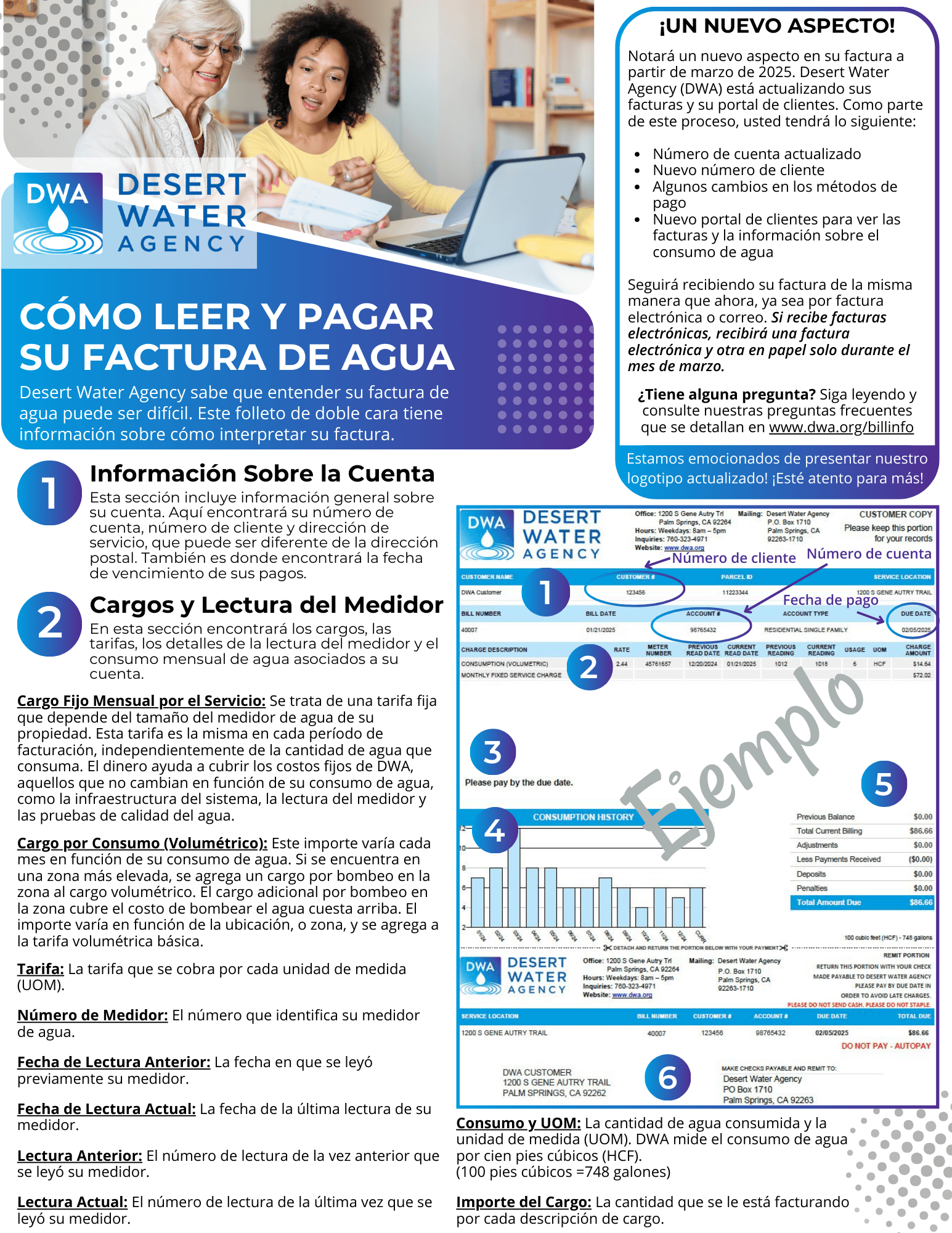
As part of the transition to our new billing system, the old myDWA platform will not be available after March 10. If you currently have a myDWA account, you will need to create a new myDWA account at www.mydwa.org. If you do not currently have a myDWA account, you can create an account at www.mydwa.org. When creating your new myDWA account, you will need your new account number and customer number, which can be found on your new bill. (View the How to Read & Pay Your Water Bill handout to see where to find your account and customer number.)
DWA’s new, upgraded billing system will allow us to utilize the latest technology to continue to serve our customers in an efficient manner. The new customer portal is designed to make it easy for customers to track and manage their bills and water usage.
Yes, your account number will change. Old account numbers were nine digits long. Your new account number will be the first eight digits of your old account number. You will now also have a six-digit customer number. See the example below. View the How to Read & Pay Your Water Bill handout to see where to find your new account number and customer number on your bill.
Old Account Number: 12345678-9
New Account Number: 12345678
New Customer ID: 789101
Customers will begin receiving bills with the new look after March 10. The myDWA customer portal will also transition on March 10. After March 10, your old myDWA account will no longer be accessible. You will need to set up a new account at www.mydwa.org.
No, you will continue to receive your bills the same way you do now – either paper by mail or e-bill via email.
To change the way you receive your bill, please sign up for a new myDWA account. The new portal will have an option where you can change your billing and mailing preferences.
If you are registered to receive e-bills, you will receive a paper bill and an e-bill for the month of March only. This is to ensure a smooth transition to the new billing system. After March, you will continue to receive your bill only electronically.
The last bills from our old billing system will go out at the end of February. We will pause our billing for the first week of March and will resume billing on Monday, March 10. Any bills that have been delayed during this time will still have two weeks to pay from the billing date of March 10. After that, you will be back on your normal billing schedule. You will not receive a late fee during this time.
Yes and no. Customers will remain on their current billing cycle. However, during the transition period to the new billing system, DWA will not be processing any bills from March 1 to March 10. Accounts that would have typically been scheduled to be billed during this time will be billed on March 10. Due dates for these bills will be extended to accommodate the transition, for the month of March only. Even though you are being billed later, you will still have the normal two weeks to make payment. After March 10, all customers will return to their normal billing cycle.
No, DWA will not charge late fees in March as we transition to the new billing system.
You can use DWA’s old phone and online payment methods until March 10. You can also visit our office to pay your bill.
Payment Methods
If you were enrolled in AutoPay under the previous myDWA system, your payments will continue to be processed automatically. There is nothing else you need to do.
However, if you want to make changes to your payment information, including the new option to pay via credit card, you will need to reenroll in AutoPay at www.mydwa.org.
To pay your bill online, please visit www.mydwa.org. You can either select Quick Pay to make a one-time online payment or create a myDWA account to pay and manage your billing. Once you create an account, you can log in and select Pay Bills to make an online payment.
You can also pay online using your bank’s online bill pay service. Please see below for more information.
No, you don’t have to create a myDWA account to pay online. Visit www.mydwa.org and select Quick Pay to make a one-time payment without registering. You can also continue to pay your bill through your bank’s online bill pay service.
However, creating a myDWA account is the best way to manage your billing preferences and see your water consumption history.
Yes, you can make payments using your bank’s online bill pay service. You will need your new DWA account number and customer number, which can be found on your new bill. Please enter the eight-digit account number and six-digit customer number separated by a dash. Example: 12345678-789101
Call 833-742-4416 to pay by checking account or credit card over the phone. You will need your new DWA account number and customer number, which can be found on your new bill. Please be sure to call the new phone number, listed above. Payments will no longer be accepted at the previous phone number.
In addition to paying by phone, AutoPay or online, you can pay via mail, in person at our Operations Center, or by check at our “Water Tower” drop-off box located in the Operations Center parking lot. For more information, visit www.dwa.org/billpay or read the How to Read & Pay Your Water Bill handout.
myDWA Customer Portal & Registration
Customers can create a new myDWA customer portal account beginning on March 10. Until then, the new system will not be available and will not allow you to create a new account.
Go to www.mydwa.org to create a new myDWA account. You will need a valid email address and your new DWA account number and customer number. These numbers will be available on your March bill. For instructions on how to set up a new myDWA account, please see below or click link for a step-by-step visual guide.
HereIf you need further assistance or want to set up your account prior to receiving your bill, call us at 760-323-4971.
Registration steps:
- Go to www.mydwa.org
- Click on “myDWA Customer Portal” under “Available Services”
- Click the “Sign In or Sign Up” button
- Go to the bottom of the page and click “Create an Account” (skip the box that says to enter your email)
- Fill out the required fields and click “Sign Up”
- Check your inbox for an email with a code from Community Access Identity
- Go back to the webpage and enter the code. Click “Verify”
- Click “Continue” at the bottom of the page OR set up a security method following the prompts (optional)
- You will be redirected to the myDWA portal
- Click “Add Account”
- Enter your new DWA account number and customer number. You can find these on your new bill.
- You can now pay your bill and manage your account online.
Bills prior to March 2025 will not be available on the new myDWA customer portal. However, if you need a copy of a past bill, please call us at 760-323-4971 and we will be happy to provide you with a copy.
Yes, you will be able to view the past four years of water consumption on the myDWA customer portal. This information can be useful in making conservation decisions. Learn more about conservation at www.dwa.org/save.
At this time, no. The ability to view daily water usage is part of the next phase of this process, within approximately 18 months.
Yes, the new platform uses security measures, including secure authentication, to protect your personal and financial information.
For support using the new customer portal, please contact DWA at 760-323-4971 or support@mydwa.org.
Payment Plans
Yes, if you are currently enrolled in a payment plan, it will carry over to the new system. The payment plan installment due and balance will be reflected on your bill. If you have any questions about how it appears on your new bill, call 760-323-4971, ext. 129.
Payment plan installments will be included on your monthly bill and should be paid along with the regular monthly bill, using any of the available payment options.
For more information on payment plans and other bill assistance resources, call 760-323-4971, ext. 129, or go to www.dwa.org/h2o.
Multiple Accounts/Group Billing
Yes, you will get an individual bill for each account.
No, we do not have the option to provide one statement for customers with numerous accounts. However, multiple accounts can be managed and paid for under one myDWA customer portal account.
Yes, you can add all your accounts to your myDWA customer portal and manage them online at www.mydwa.org. For assistance setting up a myDWA customer portal with multiple accounts, please call 760-323-4971, ext. 131.
Yes, once your accounts are added to the myDWA customer portal, you can select which accounts you would like to make a payment towards.
For help adding multiple accounts to your myDWA customer portal, please read the step-by-step instructions or call us at 760-323-4971, ext. 131.
Here